How to read a lead card: what Swashi researches about each lead
Learn what Swashi finds about each lead and company, from decision-makers and verified contacts to revenue, signals and ICP score, and how to read a lead card.
For every lead, Swashi researches the company and the person behind it: who the decision-maker is, how to reach them, how big the business is, and what signals suggest it is a good fit. It puts all of this on one lead card, together with an ICP score that tells you how closely the lead matches your ideal customer.
This page explains what Swashi looks for, how to read each part of a lead card, and where research shows up after you start contacting people.
What Swashi researches
When you click Find Leads, Swashi searches business listings and directories for the role or industry and location you entered, gathers contact details, verifies every email, and scores the result against your ideal customer profile from your Business Brain. A search typically takes 60 to 120 seconds. Leads are deduplicated, so the same business does not appear twice.
Leads are found and described in your own language. In several markets, Swashi finds, validates and contacts leads natively in the prospect's language.
How to read a lead card
Here is an example card from the EP2 tutorial, read left to right:
Standard · ICP·A 80 · Northwind Lending · Rowan Warren · VP of Loan Conversions · rowan.warren@northwindlending.example ✓ · +1 (555) 0150-1687 · northwindlending.example · Suffolk, Virginia · 💰 618.0M · 👥 1.2K employees · High Ticket · LinkedIn Active · Verified Email
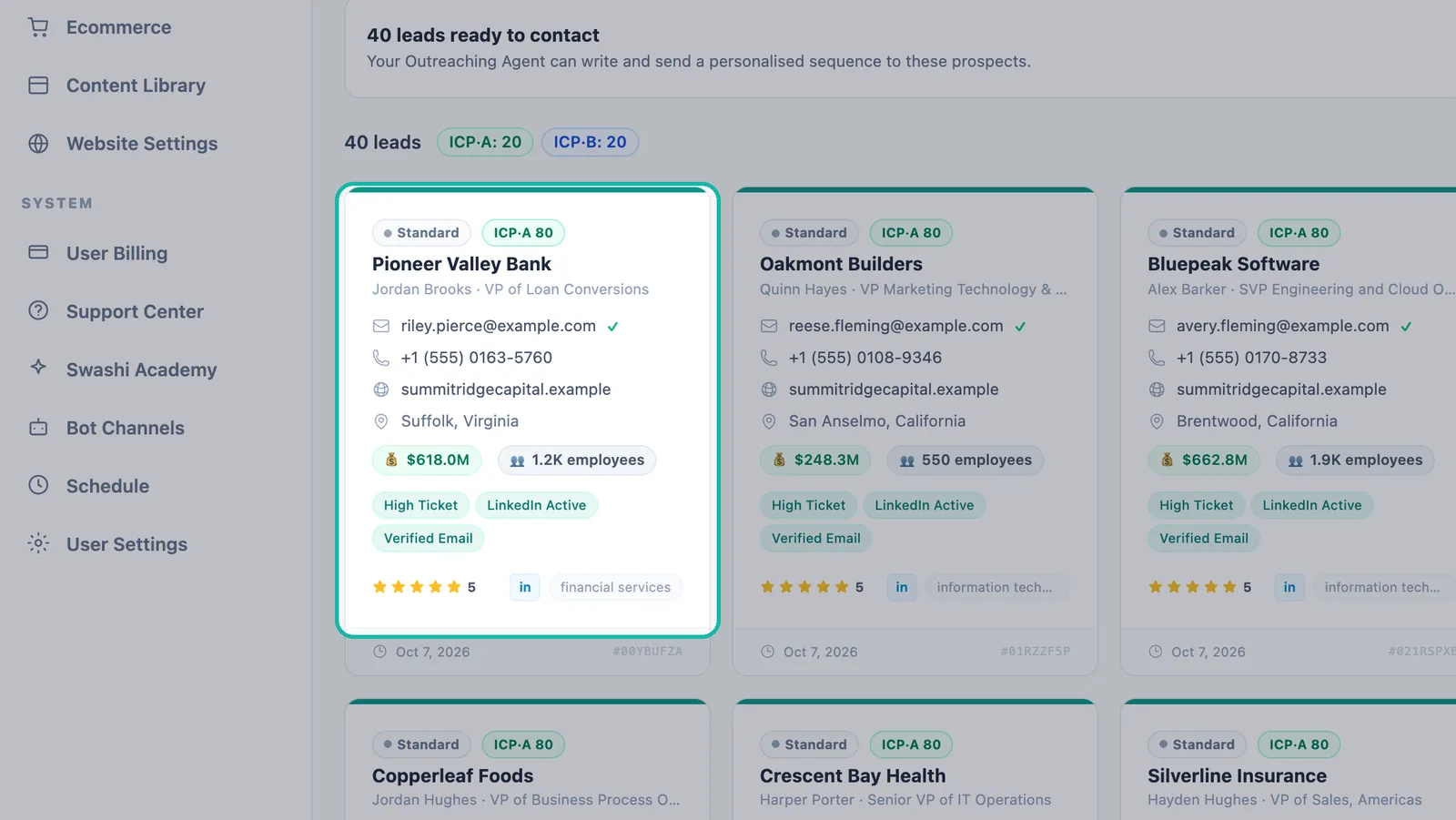
| Part of the card | What it means |
|---|---|
| Standard, Golden or Super Golden | The Growth Hub ranking. It ranks your pipeline so campaigns start from your best leads. |
| ICP·A 80 | The ICP tier (A, B, C or D) and the ICP score from 0 to 100. See ICP and lead tiers. |
| Company name | The business Swashi found. |
| Person and title | The decision-maker and their role, for example a VP. |
| Email with ✓ | The email address. A check mark means it is verified. See verified leads. |
| Phone | A direct phone number, when found. |
| Website | The company's website, when found. |
| Location | The city and state or region. |
| 💰 | The company's annual revenue. |
| 👥 | Team size (number of employees). |
| Tags | Signals such as High Ticket, LinkedIn Active and Verified Email. |
| Status | Where the lead is in your pipeline (see below). |
Cards may also show the business category, a Google rating and review count, the date the lead was added, and a short Lead ID you can use to refer to a specific lead.
Tip:A lead marked 🧭 Explore comes from an adjacent niche outside your usual ICP. It is worth a test: niches that work can become new target markets.
Signals Swashi detects
Signals help you choose who to contact and what to say. Some appear as ICP Tags you can filter by, including Decision Maker, Senior Stakeholder, High Ticket, High LTV Potential, 1M+ Revenue, Verified Email, LinkedIn Active, Voice Agent Compatible, AI Ready, Fast-Growth Signal, Website Opportunity and Appointment-Based. See the filters reference.
Swashi also looks for signals in a business's online presence, such as:
- a LinkedIn presence
- an online booking system
- paid advertising
- a WhatsApp contact number
- job postings (a growth signal)
- no website (a website opportunity)
- few reviews (fewer than 10 Google reviews)
- a recently opened business (less than 12 months)
These feed the five dimensions of the ICP score: niche fit, outreach readiness, digital presence, business maturity and website opportunity.
Lead status
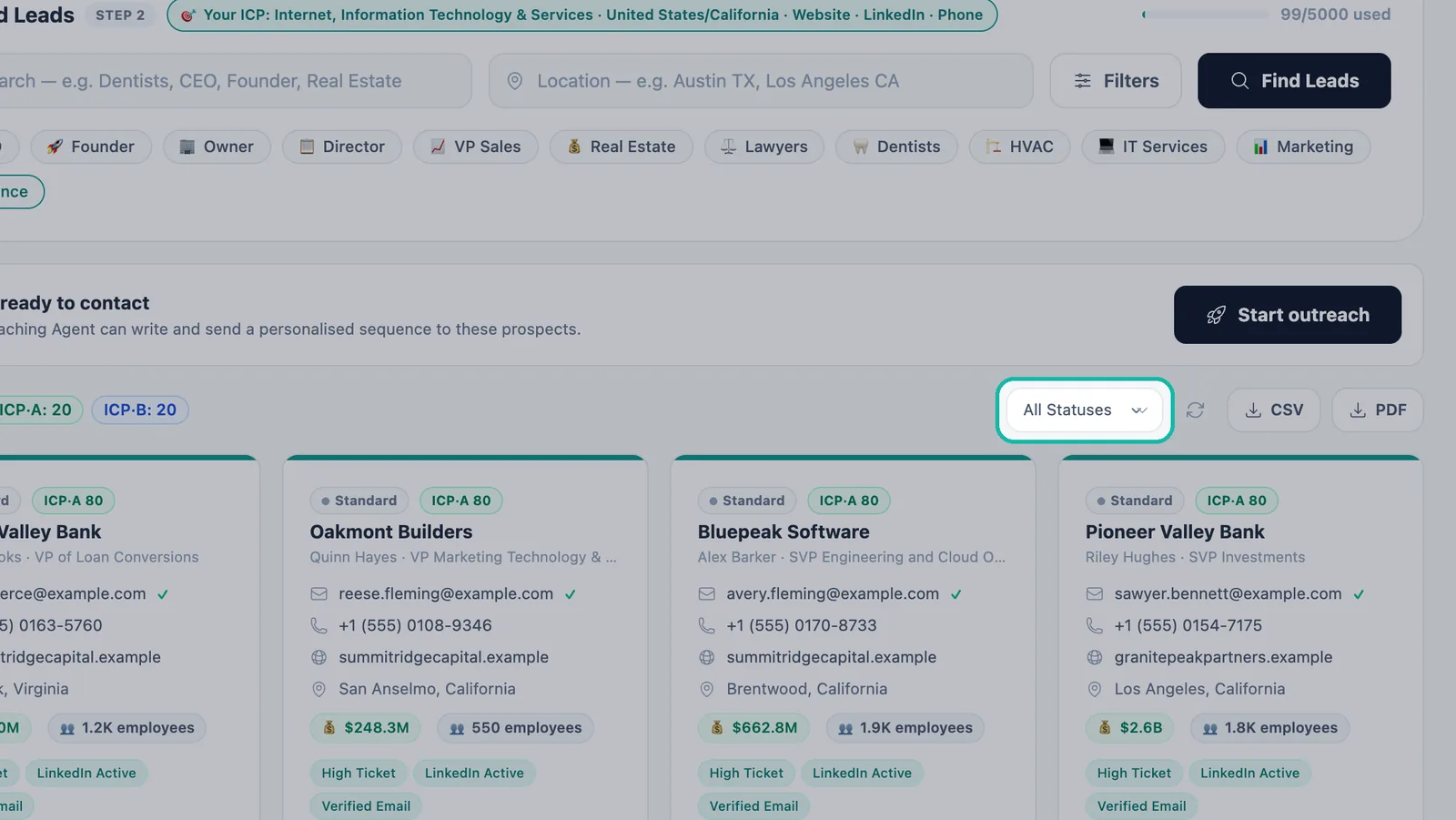
Statuses show where each lead stands. They update automatically when the Outreach Agent sends emails or detects replies.
Leads move through these statuses:
NEW → CONTACTED → REPLIED → WARM → HOT → CLOSED
                                 ↘ COLD
A lead starts as NEW, becomes CONTACTED once you reach out and REPLIED when they answer. From there it can warm up (WARM, then HOT) toward CLOSED, or go COLD.
Use the All Statuses menu above your leads to filter by status.
After you make contact
Research keeps growing as your outreach runs. On the Business page, Opportunities lists people showing buying signals, and Lead Journeys shows a per-person timeline from discovered to contacted, replied and meeting. Sections there activate as data arrives; until then they say "activating" or "Not measured" instead of showing a number. In Reports, the Lead Pipeline section shows your total leads, tier A and tier B counts, and how many you have contacted. See reports.
Troubleshooting
- A card has no email or phone. Swashi shows only what it finds. Turn on Email and Phone under Has Contact in your next search.
- The revenue or team size is missing. These details appear only when Swashi finds them. Use the Annual Revenue or Company Size filter to keep only leads that match your range.
Next steps
Frequently asked questions
What information does Swashi find for each lead?+
Depending on what is available, a lead card shows the business and the decision-maker with their title, an email (with a check mark when verified), a phone number, the website, the location, annual revenue, team size, signal tags, and an ICP tier and score.
Why do some leads have no email or phone?+
Swashi shows contact details only when it finds them. Use the Has Contact filter to require Email or Phone, and Verified Email under Contact Quality to keep only checked addresses.
What are signals on a lead?+
Signals are tags Swashi attaches during research, such as Decision Maker, High Ticket, LinkedIn Active or Website Opportunity. They help you pick the right leads and the right message.
Are leads described in my language?+
Yes. Leads are found and described in your own language, and in several markets leads are found, validated and contacted in the prospect's own language.
Where can I follow a lead after I contact them?+
Use the lead status on the card and the All Statuses filter on the Lead Generation page. The Business page also shows Lead Journeys, a per-person timeline from discovered to contacted, replied and meeting.