ICP scoring and lead tiers A, B, C and D
Understand how Swashi scores every lead 0–100 against your ideal customer profile and sorts it into tiers A, B, C or D, and how to use tiers in campaigns.
Swashi gives every lead an ICP score from 0 to 100 that measures how closely it matches your ideal customer profile (ICP), then places it in one of four tiers: A (75–100), B (55–74), C (35–54) or D (0–34). Use tiers to decide who to contact first: start with tier A, then add tier B.
Product: Lead Gen & Outreach Automation
This page explains where your ICP comes from, how the score is built, what each tier means, and where tiers appear across Swashi.
Where your ideal customer profile comes from
Swashi reads your Business Brain, so every lead search starts from your ideal customer profile. On the Lead Generation page you will see it as a line beginning 🎯 Your ICP:, which lists the industry, the market and the contact channels Swashi is targeting for you.
If that line doesn't describe the customers you want, improve your Business Brain (for example, upload your brochure, price list or website) so Swashi has more to learn from. Every agent reads the same Brain, so the change helps your outreach, voice calls and content too.
How the score is calculated
Every lead, whether Swashi found it or you imported it, is scored automatically on five dimensions:
| Dimension | What it measures |
|---|---|
| Niche Fit | How well the business aligns with your target niche |
| Outreach Readiness | Whether the business has reachable contact information |
| Digital Presence | The quality of its online footprint (website, reviews, social) |
| Business Maturity | Signals of an established, active business |
| Website Opportunity | Whether its website has room for improvement |
Scoring is additive across the dimensions, and the total is a score from 0 to 100.
The four tiers
| Tier | Score | Label in the app | Priority | What to do |
|---|---|---|---|---|
| A | 75–100 | A — Perfect | Highest | Perfect fit. Contact first, with your best message. |
| B | 55–74 | B — Strong | High | Strong fit. A good candidate for outreach and worth prioritizing. |
| C | 35–54 | C — Average | Medium | Moderate fit. Lower priority; suited to broader, general messages. |
| D | 0–34 | D — Low | Low | Poor fit. Not recommended for outreach. |
Tip:Most campaigns should target tiers A and B. Keep C for later or for testing a broader message, and leave D out of outreach.
Where tiers appear
Lead cards. Each card shows a tier badge and the score, for example ICP·A 80.
Search results. Counters such as ICP·A: 20 and ICP·B: 20 show how your results split by tier.
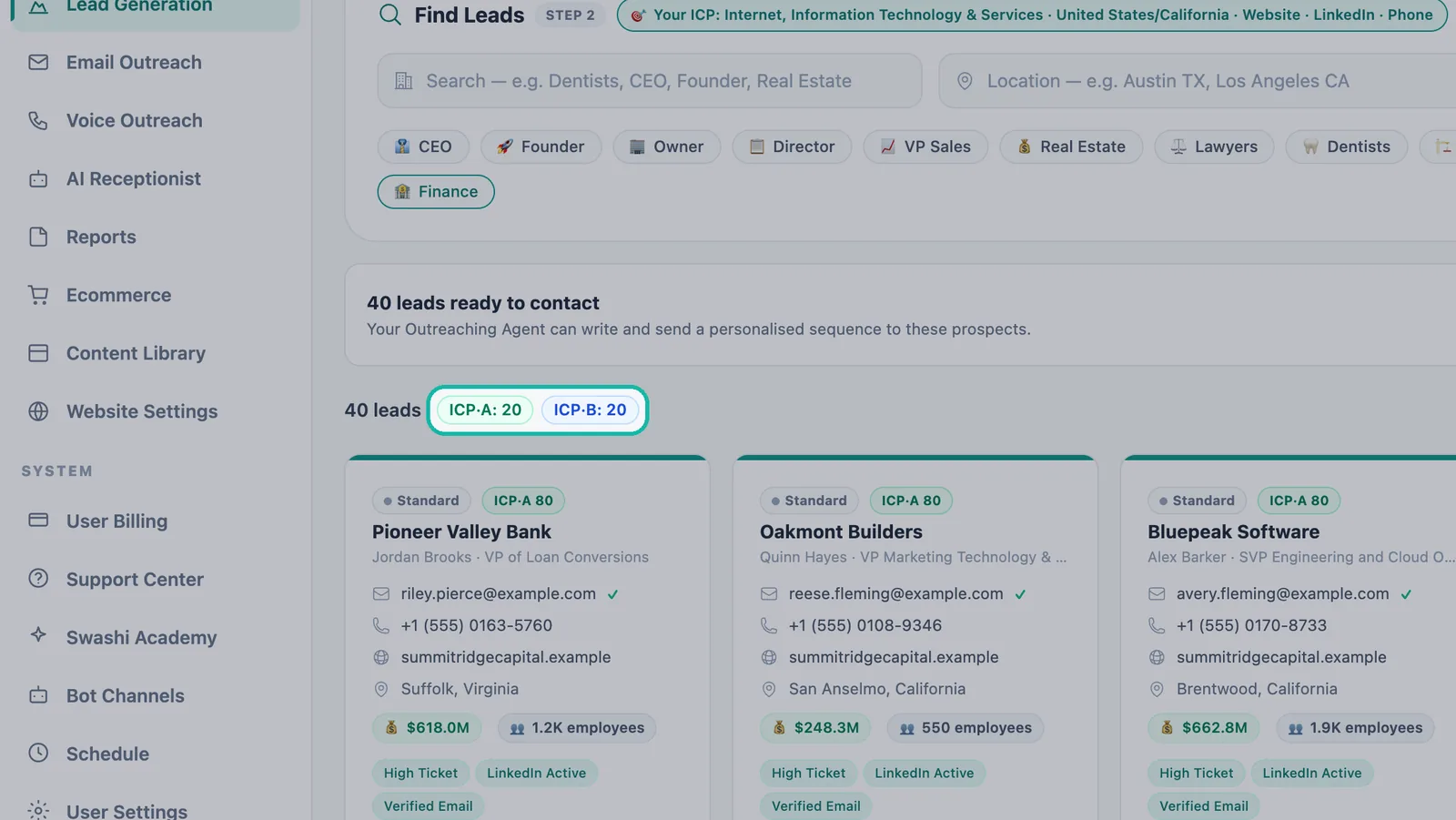
Tier counters show how your results split. Filters. The ICP Tier filter lets you search for A, B, C, D or Any. See the filters reference.
Email campaigns. In the Audience step of a campaign you choose which tiers to contact. The tutorials recommend starting with tier A, your perfect-fit leads, then adding B. See Email Studio.
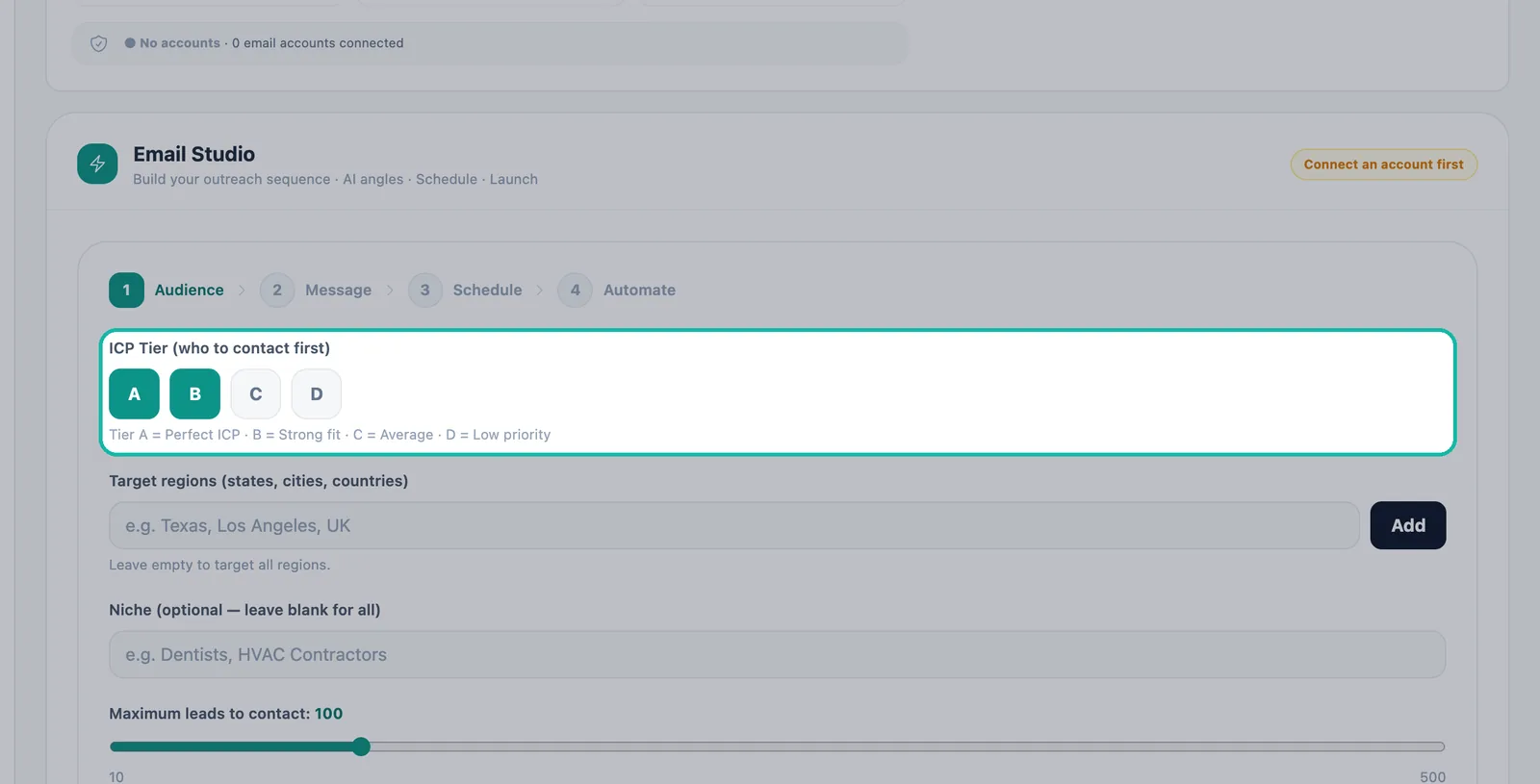
Choose which tiers a campaign contacts. Voice campaigns. When you build a calling campaign you also pick the ICP tier. See voice outreach.
Reports. The Lead Pipeline section shows your total leads, tier A and tier B counts, and how many you have contacted. See reports.
Tiers and Growth Hub ranking
Lead cards can also carry a ranking label: Super Golden, Golden or Standard. This comes from the Growth Hub on the Lead Generation page, which ranks your pipeline so campaigns start from your best leads. Tiers tell you how well a lead fits your ICP; the ranking and the Top Value sort help you pick the biggest opportunities within that fit.
You may also see an 🧭 Explore label. It marks a lead from an adjacent niche outside your usual ICP. It is worth a test: niches that work can become new target markets.
Troubleshooting
- Most of my leads are tier C or D. Your search may be outside your ideal customer profile. Check the Your ICP line, add detail to your Business Brain, and search with roles or industries closer to your best customers.
- I see too few tier A leads. Add tier B in the ICP Tier filter, widen the location, or remove a narrow filter.
Next steps
Frequently asked questions
What is an ICP score?+
It is a score from 0 to 100 that rates how well a lead matches your ideal customer profile. Swashi scores every lead automatically across five dimensions: niche fit, outreach readiness, digital presence, business maturity and website opportunity.
What does a tier A lead mean?+
A tier A lead scored 75 or above, the highest rating. It closely matches your ideal customer profile and should be contacted first, with your best message.
What is the difference between tiers A, B, C and D?+
A is 75–100 (perfect fit), B is 55–74 (strong fit), C is 35–54 (moderate fit, lower priority) and D is 0–34 (poor fit, not recommended for outreach).
Where does Swashi get my ideal customer profile?+
From your Business Brain. Swashi reads what you have taught it about your business, so every search starts from your ideal customer profile, shown on the Lead Generation page as Your ICP.
Are imported leads scored too?+
Yes. Leads you import are validated and scored like the leads Swashi finds for you.