How to get a local Swashi number in your country
Choose your country in Voice Outreach and get a local business number in 28 countries, with registration handled in the app and calls in each lead's local time.
- 1Open Voice Outreach. Open Voice Outreach from the sidebar in the Swashi app.
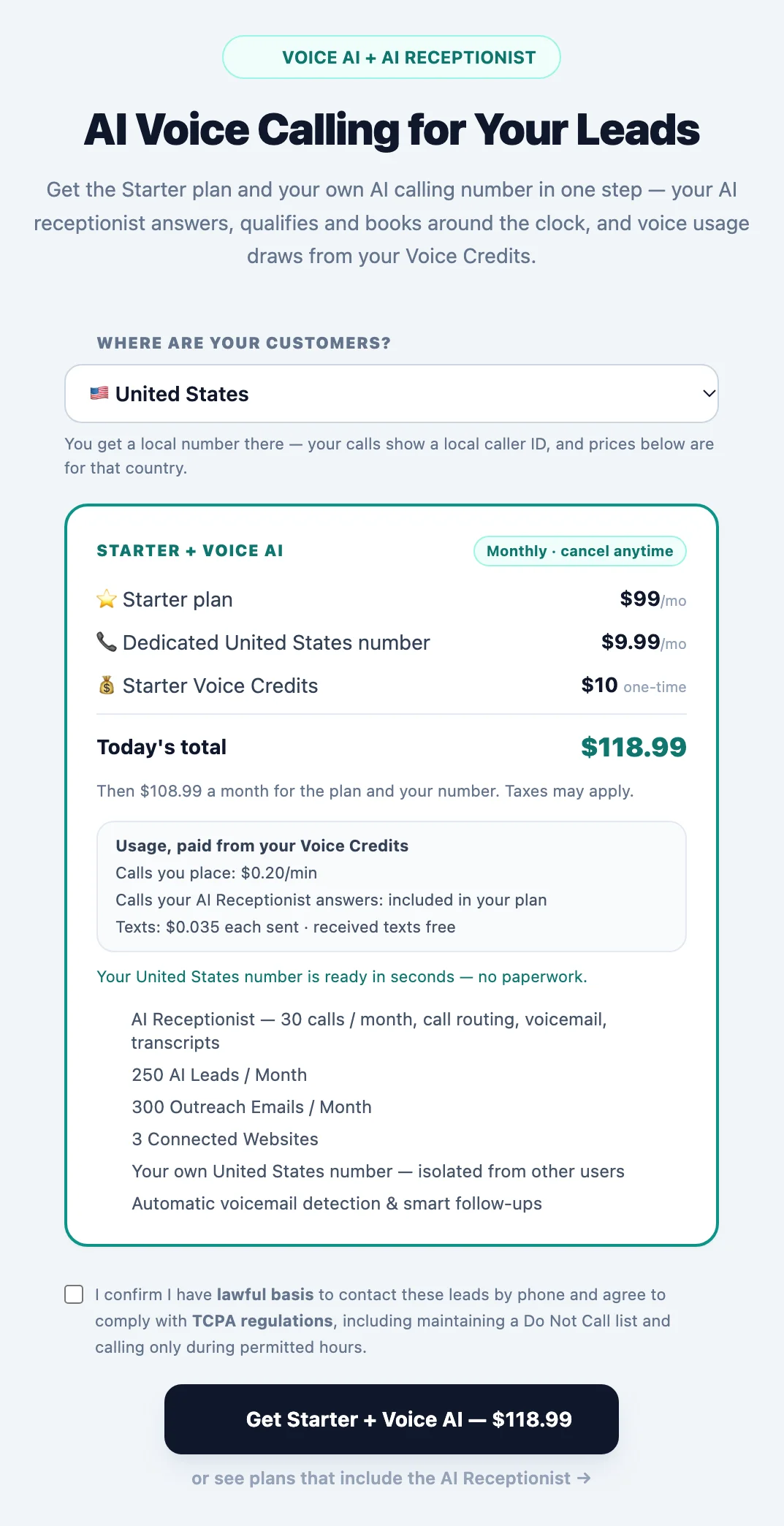
- 2Choose your country. Under Where are your customers?, choose the country your customers are in. The card shows that country's number, call and text prices.
- 3Check what registration needs. Read the note under the prices: ready in seconds, business details only, or business details plus one document.
- 4Activate. Tick the calling-rules confirmation and click the activation button. It shows today's total before you go to checkout.
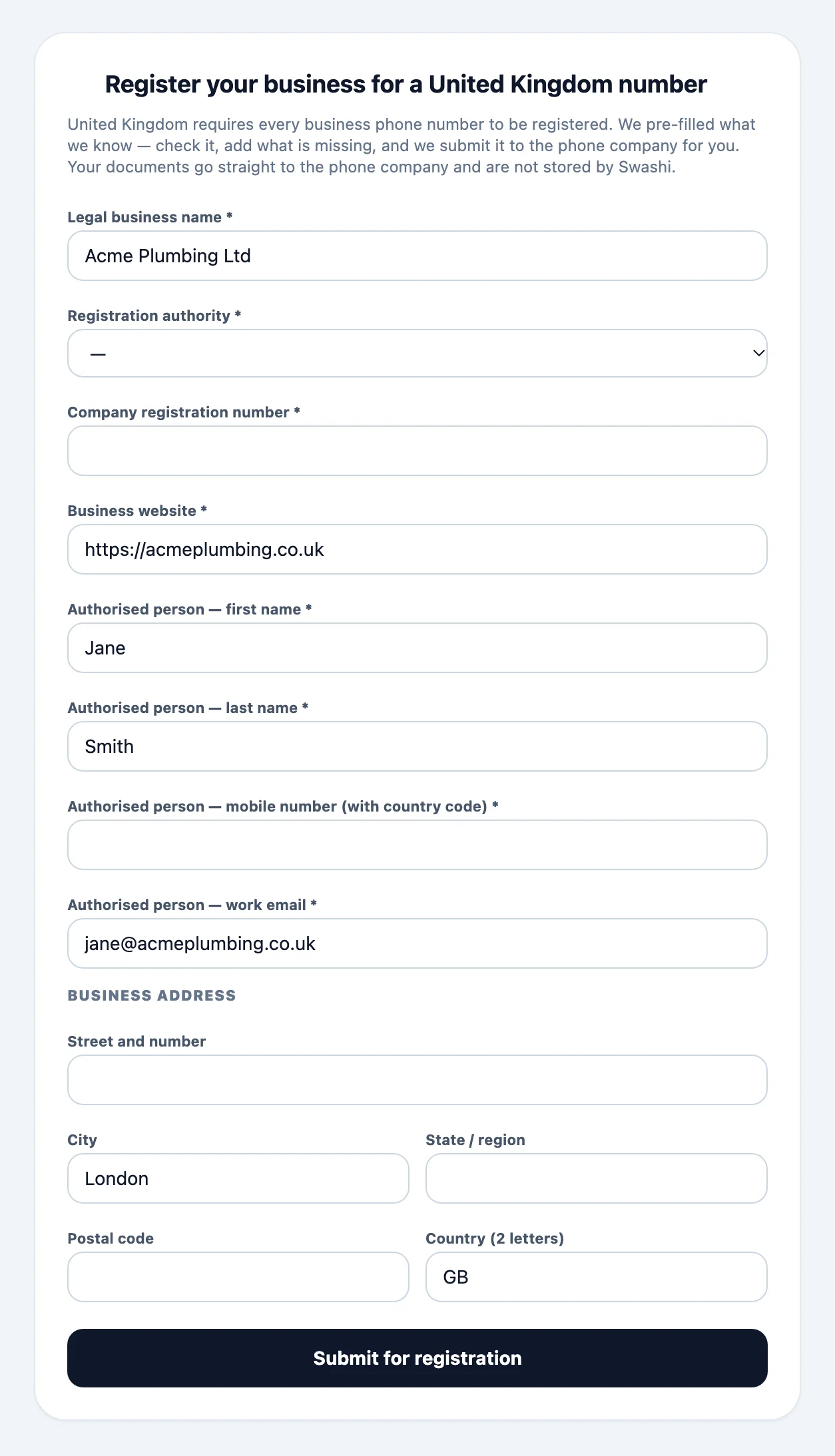
- 5Register your business if asked. In countries that register numbers, confirm the pre-filled business details, upload the document asked for and submit.
- 6Wait for approval. Registration is usually approved within 1 to 3 business days. You get an email and a notification when your number is live.
Swashi gives you a local number in the country where your customers are. Your AI Receptionist answers it, your AI personas call your leads from it, and your prospects see a local caller ID. Choose the country once, when you activate Voice Outreach.
Product: Voice AI
Before you start
- A paid plan. Voice needs Starter or above. See Plans and billing.
- Your Business profile. Registration forms are pre-filled from it, so keep your business name, website and address up to date.
Choose your country
Open Voice Outreach. Above the offer you see Where are your customers? — the country is pre-selected from your account; change it if your customers are elsewhere.
Everything on the card follows your choice:
- the monthly price of your dedicated number in that country,
- Usage, paid from your Voice Credits: calls you place, and texts where the country's numbers support them (some countries' business numbers are calls only),
- what registration the country needs,
- the calling rules you confirm before you activate.
Voice Outreach shows the current prices for the country you pick before you pay. Plans are compared on the pricing page.
Countries and registration
Many countries register every business phone number to a real business. Swashi tells you before you pay:
- Ready in seconds: United States, Canada, Puerto Rico and Israel.
- Business details only: United Kingdom, Ireland, Netherlands and Denmark.
- Business details and a document: the other countries — usually your company registration extract; a few countries also ask for your authorised representative's ID or a signed authorisation letter.
After checkout, Voice Outreach shows Register your business for a [country] number. Swashi builds the form from the phone company's current rules and pre-fills what it knows from your Business profile. One document can cover several requirements — upload your registration extract once. Swashi checks the form before submitting it, so a missing field is shown to you right away.
Note:Documents go straight to the phone company and are not stored by Swashi.
Registration is usually approved within 1 to 3 business days. You get an email and a notification in the bell when your number is live, or when something needs a correction — fix it and submit again.
How calls work in each country
- Calls stay local. A number calls numbers in its own country; US and Canadian numbers call each other.
- Local calling hours. Campaigns call each lead within your schedule in that lead's own time zone.
- AI disclosure in Europe. When Swashi calls someone in the EU, the wider European Economic Area, the United Kingdom or Switzerland, the first sentence says that the caller is an AI assistant, as the EU AI Act requires. Your AI Receptionist says it too on numbers in those countries.
Keep your existing number
You do not have to change the number your customers know. Forward it to your Swashi number and the AI Receptionist answers it. See Keep your number with call forwarding.
Troubleshooting
- My country is not in the list. Swashi adds countries where local numbers can be offered at a fair price. Until then, you can forward your existing number to a Swashi number — see call forwarding.
- The registration was not approved. Open Voice Outreach: the reason is shown above the form. Correct it and submit again.
- A lead was not called. The lead's number may be in another country than your Swashi number, or outside your calling hours in the lead's time zone.
Next steps
Frequently asked questions
Which countries can I get a number in?+
United States, Canada, Puerto Rico, United Kingdom, Ireland, Netherlands, Belgium, France, Germany, Luxembourg, Austria, Switzerland, Denmark, Finland, Estonia, Romania, Australia, New Zealand, Japan, Hong Kong, Israel, Thailand, Malaysia, Brazil, Mexico, Chile, Colombia and South Africa.
Why do I have to register my business?+
Many countries require every business phone number to be registered to a real business. Swashi builds the form from the phone company's current rules, pre-fills it from your Business profile and checks it before it is submitted.
Does Swashi keep my documents?+
No. Documents go straight to the phone company for the registration and are not stored by Swashi.
Can my number call other countries?+
A number calls numbers in its own country. US and Canadian numbers can call each other. This keeps calls local, trusted and fairly priced.
Can I keep the number my customers already know?+
Yes. Get your Swashi number, then forward your existing number to it. See Keep your number with call forwarding.
Can I use my existing number for outbound calls?+
Your outbound calls show your Swashi local number, which is registered for calling in its country. Your existing number keeps receiving calls: forward it to Swashi and the AI Receptionist answers it.
How long does registration take?+
In countries without paperwork the number is ready in seconds. Where the phone company requires a registration, approval usually takes 1–3 business days, and Swashi emails you as soon as your number is live.
What if my registration is not approved?+
You see the phone company's reason in Voice Outreach and by email. Correct the marked details and submit again — it takes a minute. If the registration cannot be approved, the number fee is refunded.
Are callers told they are speaking with an AI?+
Yes, where the law requires it. Callers in the EU, the EEA, the UK and Switzerland hear at the start of the call that they are speaking with an AI assistant, as the EU AI Act requires.