How to keep your number and forward it to Swashi
Forward the business number your customers already know to your Swashi number, choose which calls the AI Receptionist answers, and test it in one click.
- 1Open Voice Outreach. Open Voice Outreach once your Swashi number is active.
- 2Enter your business number. Under Connect your existing business number, enter the number your customers call, with its area code.
- 3Choose which calls Swashi answers. Choose All calls (recommended), or only calls you don't answer, or only when your line is busy.
- 4Dial the code. From your business phone, dial the code shown. On an office phone system or landline, ask your provider to forward calls to your Swashi number.
- 5Test it. Click Test it. Swashi calls your business number; when forwarding works, you see that your AI Receptionist answered.
Keep the number your customers already know — on your website, your Google listing and your cards — and let your Swashi AI Receptionist answer it. You forward your existing number to your Swashi number once; Swashi tests it for you.
Product: AI Receptionist
Before you start
- An active Swashi number. Activate it in Voice Outreach. See Local numbers by country.
- Your business phone, or access to your phone provider's settings.
Connect your existing number
- Open Voice Outreach and find Connect your existing business number.
- Enter Your business number, including the area code.
- Under Which calls should Swashi answer? choose:
- All calls (recommended) — your AI Receptionist answers every call to your number.
- Only calls I don't answer — your phone rings first; Swashi answers if nobody picks up.
- Only when my line is busy, or Missed, busy or unreachable.
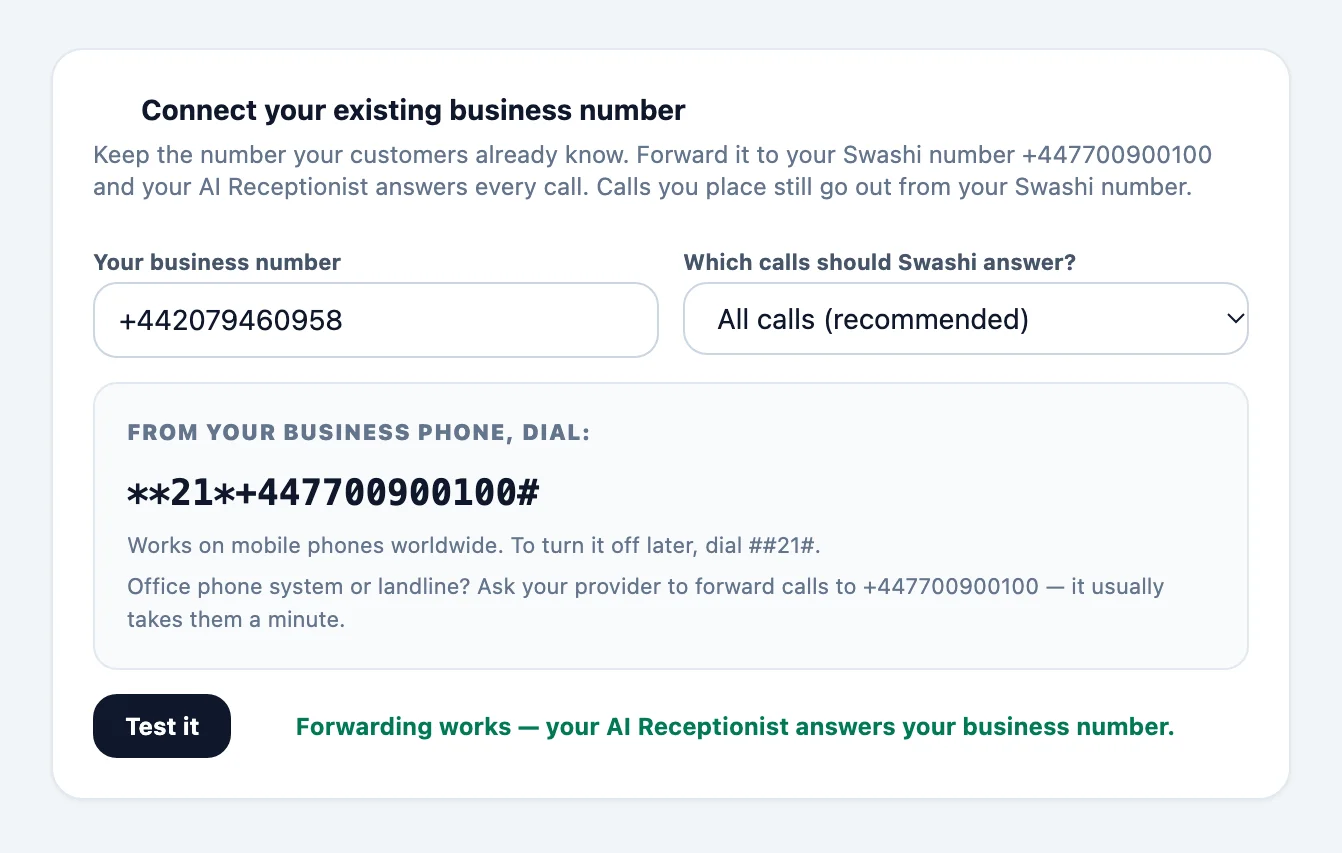
Dial the forwarding code
Swashi shows the exact code to dial from your business phone, with your Swashi number already in it. On mobile phones the codes are the same worldwide — for example **21* followed by your Swashi number and # forwards all calls, and ##21# turns it off. Verizon and most US landlines use *72 instead, and *73 to turn it off.
Tip:On an office phone system or a landline, ask your provider to forward calls to your Swashi number — it usually takes them a minute.
Test it
Click Test it. Swashi calls your business number:
- With All calls, the call is forwarded straight to Swashi.
- With Only calls I don't answer, let it ring without answering.
When the call reaches Swashi you see Forwarding works — your AI Receptionist answers your business number, and the card shows Connected. If you see that the call did not reach Swashi, check that your phone accepted the code, then test again.
How calls work after forwarding
- Incoming calls to your business number are answered by your AI Receptionist, in your chosen language. See AI Receptionist.
- Calls you place with Voice Outreach go out from your local Swashi number.
- Texts to your business number are not forwarded.
Troubleshooting
- The test did not reach Swashi. Check that the code was accepted (most phones show a confirmation), that you entered your business number with its area code, and that you did not answer the test call when using a missed-calls mode.
- My provider does not support the code. Ask your provider to set up call forwarding to your Swashi number.
- I want to stop. Dial the off code shown in Voice Outreach.
Next steps
Frequently asked questions
Do I have to change my business number?+
No. Your customers keep calling the number they know. It forwards to your Swashi number, where your AI Receptionist answers.
Which number do my outbound calls show?+
Calls the AI places go out from your local Swashi number. Your main business number is never used for outbound calls, so it never risks a spam label.
How do I turn forwarding off?+
Dial the off code shown in Voice Outreach from your business phone, or ask your phone provider to stop forwarding.
Does forwarding cost anything?+
Your phone provider may charge for forwarded calls, especially to a number in another country. Calls the AI Receptionist answers are covered by your plan.
Can texts be forwarded too?+
No. Call forwarding moves calls only. Texts to your business number stay with your phone provider.
Does forwarding work with a landline or an office phone system?+
Yes. The dial codes are for mobile phones. For a landline or an office phone system, ask your phone provider (or your system admin) to forward calls to your Swashi number. It usually takes them a minute, and you can then use Test it as usual.
Can Swashi answer only the calls I miss?+
Yes. Under Which calls should Swashi answer? choose Only calls I don't answer, Only when my line is busy, or Missed, busy or unreachable. Your own phone rings first, and the AI Receptionist picks up only the calls you cannot take.
What do my callers see and hear?+
Nothing changes for them. They dial the number they already know, and the AI Receptionist answers in the language you chose for it. They never need to learn a new number.
Can I move my number to Swashi instead of forwarding it?+
Not today. Forwarding keeps your number with your current phone provider, takes about a minute, and can be undone at any time — there is no transfer paperwork and no risk of losing the number.
What happens to my number if I stop using Swashi?+
Your number always stays yours. Dial the turn-off code shown in Voice Outreach (or ask your provider to remove forwarding) and calls ring only your own phone again.
Do I need a Swashi number to forward my calls?+
Yes. Calls are forwarded to your Swashi local number, which you activate in Voice Outreach. The same number places your outbound calls.