Swashi Chatbots

Run your whole business from a chat.

No dashboards. Message your Agents on WhatsApp, Telegram, or LINE — publish content, launch campaigns, send outreach, book calls. Your entire 24-Agent workforce is one message away, in 17 languages.

Approve on the go Voice notes work too
WhatsAppTelegramLINE connected
S

Your dashboard fits in your pocket.

Everything Swashi can do — triggered from the apps you already have open.

Command anything

Publish, schedule, scrape, email, call — trigger any workflow with a message or a voice note.

Talk, don't type

Send a voice note and Swashi understands, executes, and reports back — hands-free.

Secure by design

Authenticated gateways tie each chat to your account — powerful access, safely locked down.

17 languages · one inbox

Command in your language. Ship to every market.

Message your Agents in any of 17 languages, and they produce and publish natively for each region. One chat becomes a control panel for many go-to-market channels at once.

EnglishEspañolFrançaisDeutschItalianoPortuguêsNederlandsРусскийTürkçeالعربيةहिन्दी中文日本語한국어ไทยTiếng ViệtBahasa
See it in the real app

Run Swashi from the chat apps you already use.

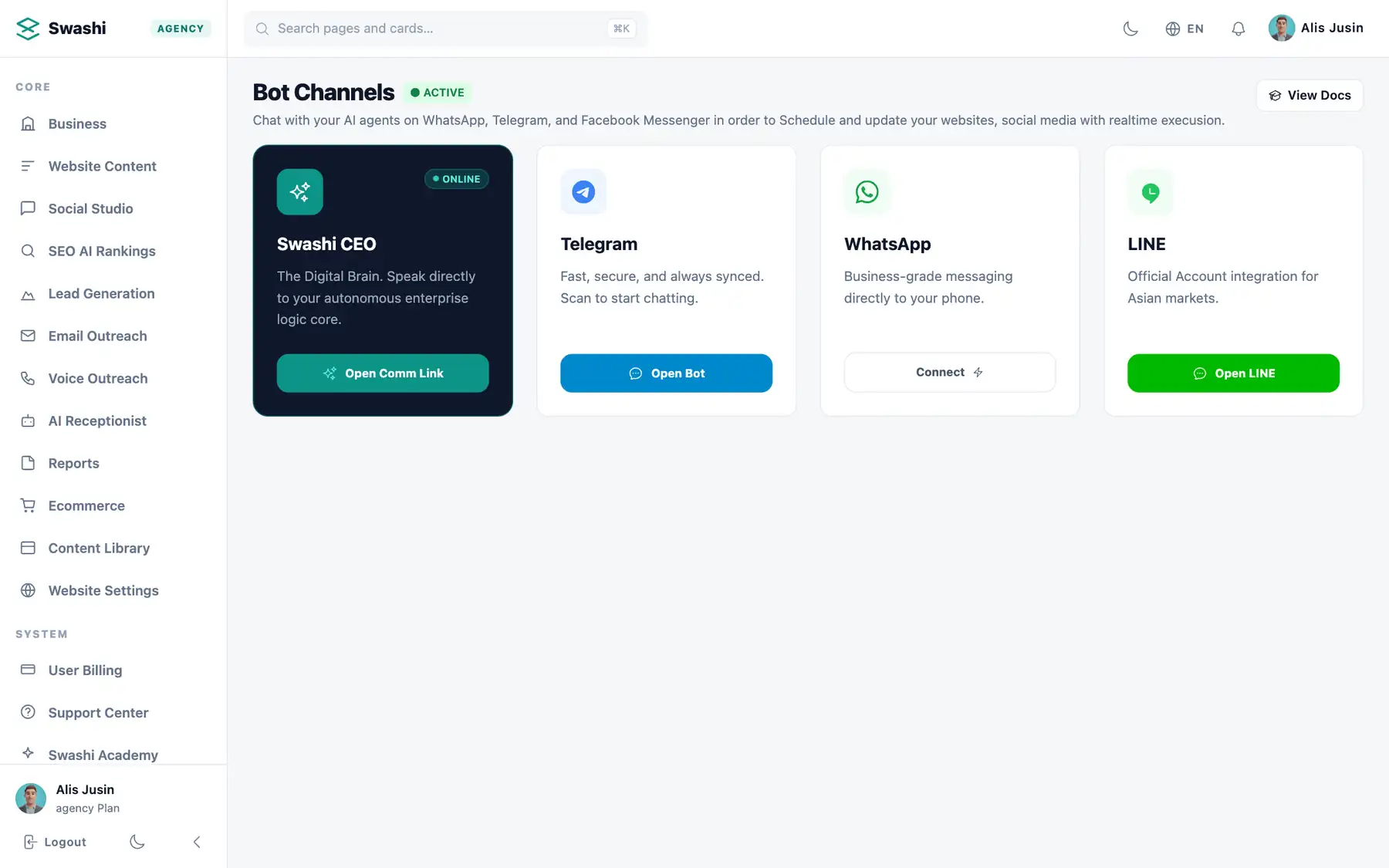
Connect Telegram, WhatsApp or LINE and keep an eye on everything your agents do.

app.swashi.io
Telegram, WhatsApp and LINE
1Telegram, WhatsApp and LINE
app.swashi.io
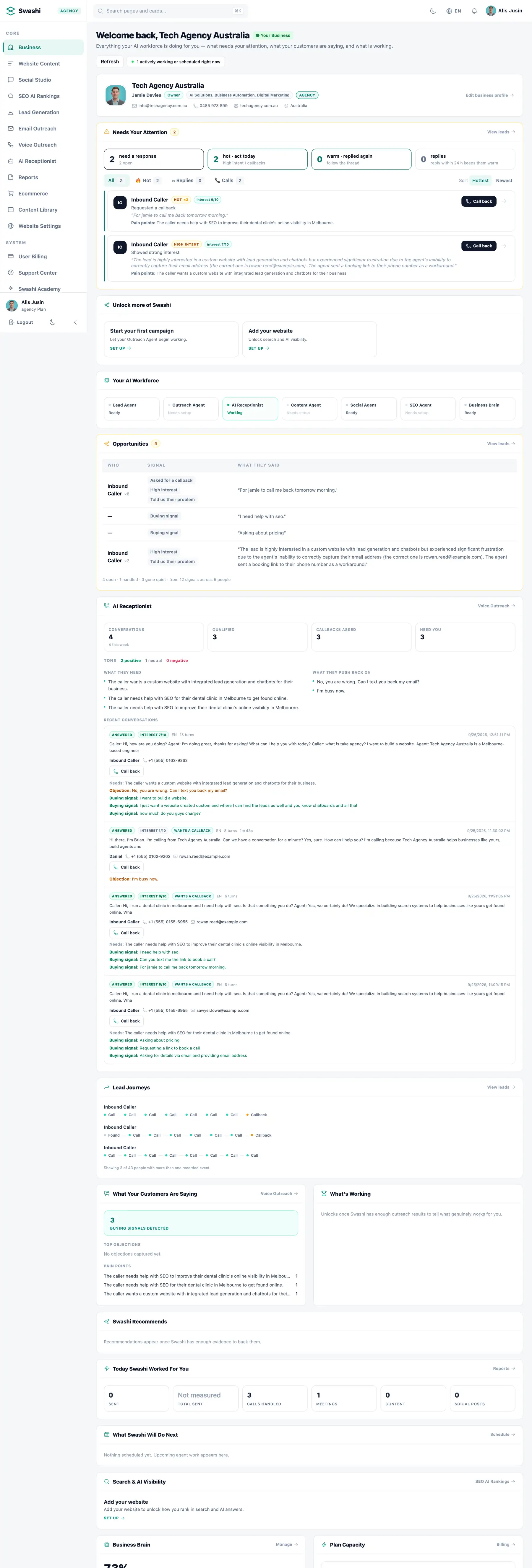
What Swashi did today
2What Swashi did today
app.swashi.io
Your AI workforce, working
3Your AI workforce, working
Try it yourself

Walk through Bot Channels

Real Swashi screens, click by click, in your language.

Walk through Bot Channels

Real Swashi screens, click by click, in your language.

Interactive · Real app
120+
interactive steps · 18 languages
Real appEvery screen is the real Swashi app. Click the pulsing dot or use the arrow keys.

How to run your business from WhatsApp, Telegram or LINE with AI Agents

Swashi Chatbots let you message your AI Agents on WhatsApp, Telegram or LINE instead of opening a dashboard. You can publish content, schedule social posts, run outreach and check results with a text or a voice note, and each chat is authenticated to your account so only you can give instructions.

  • Command your Agents from WhatsApp, Telegram or LINE
  • Publish, schedule, run outreach and check results by message
  • Voice notes understood and acted on
  • Approve posts and campaigns inside the chat
  • Each chat authenticated to your account
  • Everything done by chat is visible in the dashboard

What you can do from a chat

Most day-to-day requests fit in one message. You can ask Swashi to publish your latest draft and share it on LinkedIn, schedule this week's social posts, send outreach to newly found leads, look up how a campaign is performing or book a call with a promising lead. The Manager Agent interprets the request, passes it to the right Agents and replies with the result. Where you have approvals switched on, you can review and approve posts and campaigns in the same conversation.

Voice notes for hands-free control

Typing on a phone is not always practical. Send a voice note instead and Swashi transcribes it, works out what you want, carries it out and reports back. That suits owners who brief work while travelling between sites or walking between meetings. You can speak in your own language; the Agents respond in it and produce the output for whichever market you asked for, so a single conversation can steer work across several regions.

Security and setup

Connecting a chat app takes a one-time link to your Swashi account from Bot Channels. From then on, each gateway is tied to your account, so messages from other numbers or users cannot trigger actions. Sensitive administrative commands use additional verification. The chat is a shortcut to the same workspace you see in the dashboard: anything done by message appears there too, so your team can always see what was requested and what the Agents did.

Good habits for chat commands

Clear, specific messages get the best results. Name the channel, the timing and the goal, for example 'schedule three Instagram posts about our new menu for this week, approval first'. Keep your Business Brain current, since the Agents use it to fill in details you do not mention. For bigger changes, such as launching a new outreach campaign, review the summary Swashi replies with before confirming. Many owners use chat for quick daily actions and the dashboard for planning and reviewing results.

See it take commands.

Watch a real workflow triggered from a single chat message.

Swashi platform — key features

Meet the Agent swarm and command it straight from WhatsApp, Telegram, or LINE.

4.9/5 from 128 operators

What they message us.

“I run my entire company from WhatsApp now. 'Publish and schedule' — done. It's unreal.”

— Ravi P., Founder

“Voice notes are the killer feature. I brief it while walking and it ships the work.”

— Elena G., Marketer

“My team commands Swashi from Telegram. No logins, no dashboards, just results.”

— Kwame A., Agency

Questions, answered

More Swashi Agents to grow with

Every Agent compounds the others — one platform, one subscription.

Your workforce, one message away.

Command all 24 Agents from WhatsApp, Telegram, or LINE — starting free today.

No credit card · Cancel anytime