

AI Texting

Your AI answers the call.
Then it texts the link.

While your AI receptionist talks to a caller, it texts your booking link from your own business number. Callers text back their email, and every message lands in one inbox.

Texts from your own numberBooking link during the callOne inbox for every text
On a call · AI Receptionist
Your business number
Here's the link to book your free consultation:
yourbusiness.com/book
Thanks! My email is sam@example.com
Email captured exactly
Got it, thank you. We'll be in touch.
What it does

Texting that works while you talk.

Booking link during the call

When a caller asks for details or a link, the receptionist texts your booking link right away, once per call, so nobody has to spell out a web address.

Emails, captured exactly

The receptionist can ask callers to text their email to your number. It is captured letter for letter, and the email they were promised goes out.

One inbox for every text

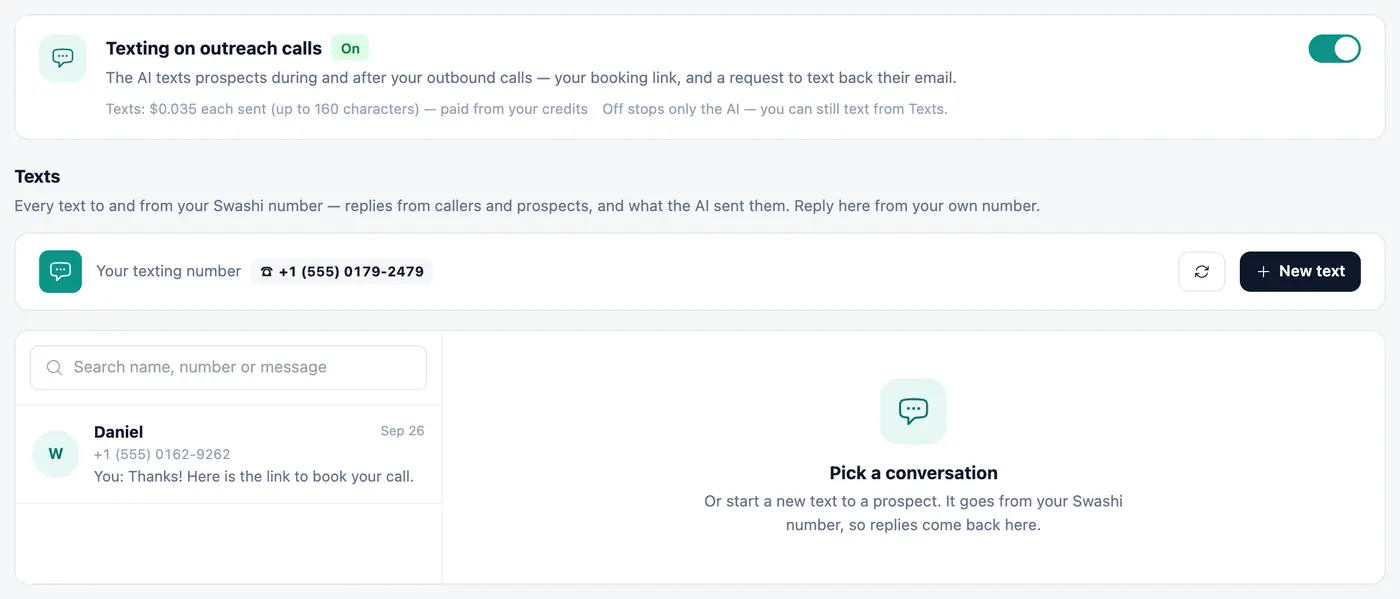
Every text in and out, from the AI or from you, in one conversation view inside Voice Outreach. Search, reply or start a new text.

Your own business number

Texts always go from your Swashi number, and replies come back to the same inbox.

Never miss a reply

Unanswered texts appear in Needs Your Attention next to callbacks and email replies, and in your notifications.

You stay in control

Turn AI texting on or off separately for incoming calls and outreach calls. You can always text people yourself.

The Texts inbox

Every conversation in one place.

Each thread shows who sent every message: your AI receptionist, your AI outreach, or you. Reply from your own number, and see the cost of each text before you send it.

app.swashi.io · Voice Outreach · Texts
Every conversation in one place.

Two switches, full control.

One for incoming calls, one for outreach calls. Switching the AI off never stops you texting people yourself.

app.swashi.io · AI Receptionist
Two switches, full control.
app.swashi.io · AI Receptionist
Two switches, full control.
Clear and simple

Pay only for what you send.

Texting uses your Swashi business number from Voice AI.

  • Texts are paid from your voice credits; received texts are free
  • The cost of each text is shown before you send
  • Works with US and Canadian phone numbers
  • People who reply STOP can't be texted
See it for real

Watch the AI make a call and text

Real Swashi screens, click by click, in your language.

Watch the AI make a call and text

Real Swashi screens, click by click, in your language.

Interactive · Real app
120+
interactive steps · 18 languages
Real appEvery screen is the real Swashi app. Click the pulsing dot or use the arrow keys.

How AI texting works with Swashi's AI receptionist

Swashi's AI texting lets your AI receptionist and AI caller send texts from your own Swashi business number while they are talking to someone, for example your booking link during a call. Callers can text back their email address, and every text in and out is kept in one inbox. It works with US and Canadian phone numbers.

  • Booking link texted during the call, once per call
  • Caller emails captured exactly by text
  • Every text in one inbox, labelled by sender
  • Separate switches for incoming and outreach calls
  • Received texts are free; the cost of each sent text is shown first
  • US and Canadian numbers; one-to-one conversations only, never bulk

Why texting during the call matters

Phone conversations often stall at the moment a caller needs a web address or has to spell an email. Reading out a long link is awkward, and a misheard letter can lose the booking. With AI texting, when a caller asks for details or a link, your receptionist sends your booking link by text straight away, once per call, so the caller can tap it while you are still talking. Add your booking link to your Business Brain first, and the receptionist knows exactly which link to send.

Email addresses captured exactly

Spelling an email out loud is where many phone leads go wrong. The receptionist can ask the caller to text their email to your number instead. The address arrives as typed, letter for letter, and the email the caller was promised during the call goes to the right place. This is a small step that protects the follow-up you have already earned, and it means the lead record in Swashi carries a correct address rather than a best guess from the recording.

One inbox, clear ownership, your switches

Every text, whether sent by your AI receptionist, your AI outreach caller or by you, appears in the Texts inbox inside Voice Outreach, with each message labelled by who sent it. You can search, reply from your own business number or start a new conversation. Unanswered texts also show up in Needs Your Attention next to callbacks and email replies. There are separate on and off switches for incoming calls and outreach calls, and turning the AI off never stops you texting people yourself. Swashi does not reply to texts automatically on your behalf.

What it is not

AI texting is for people you are already talking to. It is not a bulk SMS tool and it does not send mass text campaigns. Anyone who replies STOP cannot be texted again. Texts you send are paid from your voice credits, the cost of each text is shown before you send it, and texts you receive are free. Delivery depends on the carriers involved, so treat a text as a helpful extra alongside the call and email, not as a guaranteed channel.

Questions about AI texting

It lets your AI receptionist and your AI caller send texts from your own Swashi business number, such as your booking link during a call, and keeps every text in one inbox.

Yes. When a caller asks for details or a link, the receptionist texts your booking link during the call. Add your booking link to your Business Brain first.

Yes. On US and Canadian numbers, the receptionist can ask callers to text their email to your number, and it is captured exactly.

To the Texts inbox inside Voice Outreach, where you can reply from your own business number. Unanswered texts also appear in Needs Your Attention.

Texts are paid from your voice credits for each text you send, and received texts are free. Swashi shows the cost of each text before you send it.

Texting works with US and Canadian phone numbers today.

Yes. There are separate switches for incoming calls and outreach calls, and you can still text people yourself when the AI is off.

No. Swashi texts people you are already talking to, during calls and in one-to-one conversations. It does not send mass text campaigns.

Turn every call into a booking.

Start free and let your AI receptionist text the link for you.

Start Free — 7 DaysNo credit card · Cancel anytime